Good enough for sellers, simple enough for beginners. If you can use MS Paint you
can make merch here — and the tools go as deep as you need.
🎨
A proper toolset
14 tools — brush, shapes, gradients, text, image stamps, eyedropper — plus layers you can reorder, merge and fade. Full undo/redo.
🖼️
Upload your own logo
Drop in your own image or logo (a transparent PNG works best). It lands centred, then pull any corner to resize before placing it on the garment.
🪣
Smart panel fill
Click the front of a shirt and the bucket fills just the front — it won't flood the whole texture like other editors do.
🧵
Fabric shading
One click adds realistic folds, soft shadows and collar/cuff trim, so flat drawings start to look like real cloth.
🧍
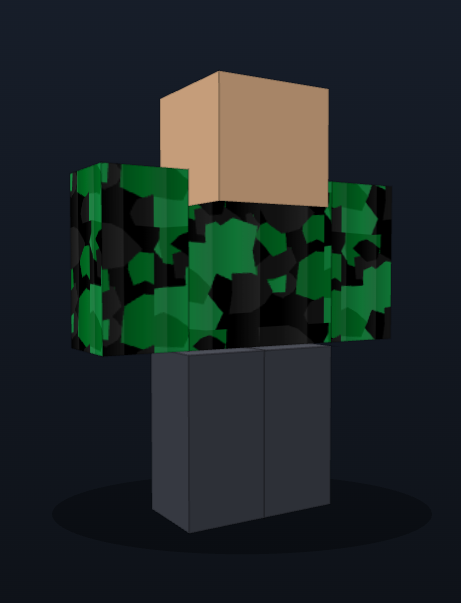
Live 3D preview
Drag to rotate your design on a Roblox-style avatar and see exactly how it wraps before you spend a single Robux.
🔷
Patterns & starters
Stripes, plaid, camo, checks, dots and gradients — drop one on as a base layer and build from there.
📐
Exact-size export
Exports at the precise pixel size Roblox requires — never blurry, never rejected for the wrong dimensions.
☁️
Saved to your account
Every design saves automatically and follows you to any device. Open the app anywhere and pick up where you left off.
✅
Publish helper
A built-in moderation checklist so you don't get rejected, a one-click link to the Roblox upload page, and a step-by-step PDF guide.
Questions, answered
Do I need anything to start designing?
No — it runs entirely in your browser. No Photoshop, no installs, nothing to download. Log in and you're designing in seconds.
Do I need Roblox Premium to sell my clothing?
To put clothing on sale, Roblox requires a Premium membership and ID verification on your own account. Designing and exporting works for everyone — selling is Roblox's requirement, not ours.
How do I get my design onto Roblox?
Export a perfectly-sized PNG in one click, then use the built-in publish helper: it checks your design against Roblox's moderation rules and links you straight to the upload page. A step-by-step PDF guide is included.
Can I use my own logo or image?
Yes — upload any image (a transparent PNG works best) or just drag it onto the canvas. It drops in centred, and you can drag it around and pull any corner to resize before placing it on the garment.
Will my work be saved?
Yes. Every design saves to your account automatically and follows you to any device — pick up exactly where you left off.
Can I cancel anytime?
Yes. It's £6/month with no contract. Cancel in one click from your account page; you keep access until the end of the period you've already paid for.
What can I make?
Classic Roblox clothing — shirts, pants and t-shirts — on the correct templates, with layers, patterns, fabric shading and a live 3D preview.